PICK YOUR REDEMPTION SPOT
Code listings
1 officially advertised code, 7 other third-party listings, and 1 with uncertain availability. Read the game’s response when redeeming.
9 code listings
NEWUPDATEOfficially advertised50× luck on your next throw
Shown in the developer’s game description. Not redeemed by this site.
Shop → CodesSUPERTHROWThird-party listedNext throw: Legendary or better
Listed by Roblox Den. Not independently redeemed.
Shop → CodesSEKRETDINOThird-party listedSecret Spear
Use the Skeleton’s secret-code prompt, not the Shop.
Lobby SkeletonPulladinoThird-party listed100× luck on your next throw
Keep the spelling and capitalization shown.
Shop → CodesHaniadagahubertThird-party listed100× luck on your next throw
Keep the spelling and capitalization shown.
Shop → CodesRELEASEThird-party listed100× luck on your next throw
Availability can change after updates.
Shop → CodesThebestgameThird-party listed50× luck on your next throw
Keep the spelling and capitalization shown.
Shop → CodesVOLCANOAvailability uncertain144,000 Cash + 100× luck on your next throw
A newer tracker lists it; a dated guide warns it may have expired. Try once and read the in-game response.
Shop → CodesQuick answer
- NEWUPDATE is advertised by the developer for 50× luck on your next throw. The other entries below are published third-party listings; none has been independently redeemed by this site.
- Match the redemption spot before trying a code. SEKRETDINO uses the Skeleton and SOBOTAUPDATE uses the Egg, rather than the Shop.
On this page
Redeem a Shop code

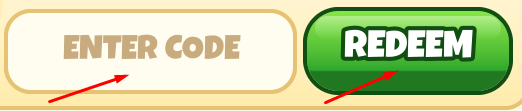
For NEWUPDATE, the advertised boost applies to your next throw. As a preparation tip, finish any planned training and practice the timing meter before spending that throw. No stacking rule or guaranteed catch is confirmed.
- Open the official Pull a Dino experience and wait until your character has loaded.
- Choose SHOP on the left side of the game screen, then choose CODES inside the shop.
- Paste a Shop code into ENTER CODE and choose REDEEM. Keep its capitalization and remove extra spaces.
- Read the game’s response before trying again. A copied code is not a redeemed code; the site cannot check your account.
SEKRETDINO: use the Skeleton
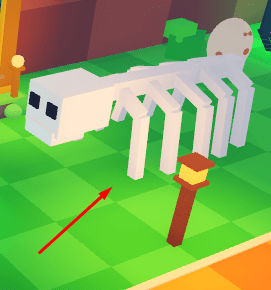
- Look for the white dinosaur skeleton on the right side of the lobby.
- Approach it and use the interaction prompt. The illustrated PC guide shows E; on other devices, follow the prompt actually displayed.
- Enter SEKRETDINO in ENTER SECRET CODE and choose UNLOCK.
- Read the result in the game. The published reward is the Secret Spear; this site has not tested delivery.
SOBOTAUPDATE: use the Egg
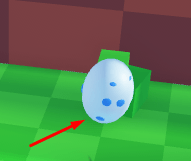
- Look for the pale, blue-spotted egg on the left side of the lobby.
- Approach it and use its interaction prompt. The illustrated PC guide shows E.
- Enter SOBOTAUPDATE in ENTER SECRET CODE and choose UNLOCK.
- Check the game’s response. The third-party listing describes a reward of 1 Spear.
If a code does not work
| What you see | What to check next |
|---|---|
| Invalid or unrecognized | Compare spelling and capitalization, remove spaces, then check that the code is being entered at the correct spot. If it still fails, leave it and check a later developer announcement. |
| Already redeemed or claimed | That account may already have used the code. Copying it again does not reset redemption. Move to another listing. |
| No expected luck or reward | Read the game’s confirmation. Next-throw rewards are not permanent boosts, and this site cannot inspect your inventory or account. |
| VOLCANO fails | Its availability is uncertain across dated reports. Do not assume that the published reward means the code still works. |